You can search the Service.com.au directory to find tradies by trade and location, then compare their listings before you choose who to contact.
Open the homepage
Go to Service.com.au and scroll down to the Find Professionals section.
Open the directory search
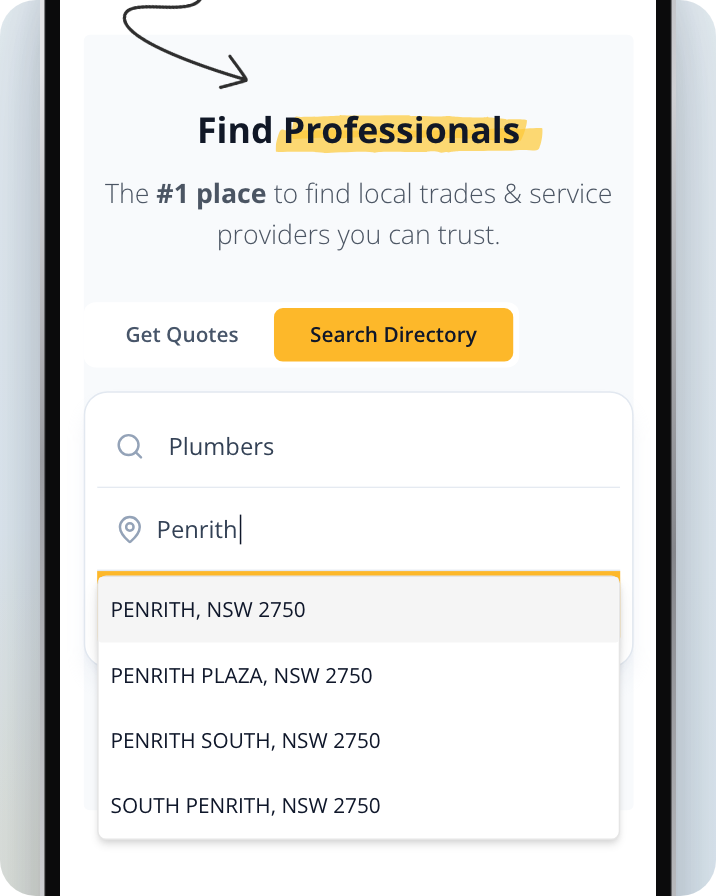
Select the Search Directory tab. The section opens on Get Quotes, so switch tabs before you search.
Enter a trade and your location
Enter the trade you need in What are you looking for? and pick it from the list. Then start typing your suburb or postcode in Enter location and pick your area from the suggestions. Suggestions appear once you've typed at least 3 characters. On a phone, the suggestions cover the Search button until you pick a place, and picking one closes the list.
Search
Click on Search to see the tradies listed for that trade in your area.
Compare the results
Each result shows the tradie's rating and number of reviews (or No reviews yet), their main trade, their suburb and any badge they hold (Verified, Trusted or Recommended). Some also show a review from a homeowner.

Open a tradie's listing
Click on View profile to see a tradie's full listing.
If there are no results
If no tradies are listed for that trade in your area yet, you'll see two options:
- Get a quote lets you describe your job, and we'll send it to tradies nearby. It's free for homeowners.
- Browse nearby suburbs shows the same trade in other suburbs in your state.
Browse every category
To see the full list of trades and services, go to service.com.au/find. Use Search categories... to filter the list, or scroll through Browse all categories and select a category to open it.