If your leads aren't turning into real jobs, the way you respond usually makes the difference. Homeowners tend to hire the business that replies quickly, clearly shows it has read the job and keeps the conversation going. These five steps can help you turn more leads into paying jobs.
1. Respond Quickly
Reply to new leads as soon as you can. A fast reply gives you a better chance of speaking with the homeowner before they've settled on someone else.
New leads arrive in your Inbox. Open a lead to see the job details, then select Respond now to send your response.
If the button reads Respond instead of Respond now, your listing can't respond to this lead yet. Selecting Respond shows what you need to do first. For example, a Basic listing is taken to the plan page, because responding to leads needs Premium.
2. Avoid Judging the Lead Too Early
Review each lead with an open mind. A job that seems small or unclear at first can still turn into valuable work, repeat business or referrals.
If a lead really isn't right for you, select Not interested so it doesn't sit in your Inbox. It moves to Archive.
3. Make Your First Response Count
Your response is often the first impression the homeowner gets of your business. Here's how to send it.
Open the lead
Go to your Inbox and select the lead.
Select Respond now
Select Respond now at the bottom of the lead. The Respond to request form opens.
Add an estimate if you can
Enter a price in Estimate (optional) if you can give one. Leave it blank if you need an inspection or a chat with the homeowner first. You can update the estimate later.
Write your message
Write your message in Message, or select Quick message to start from one of your saved messages. Choosing a quick message replaces what you've already typed.
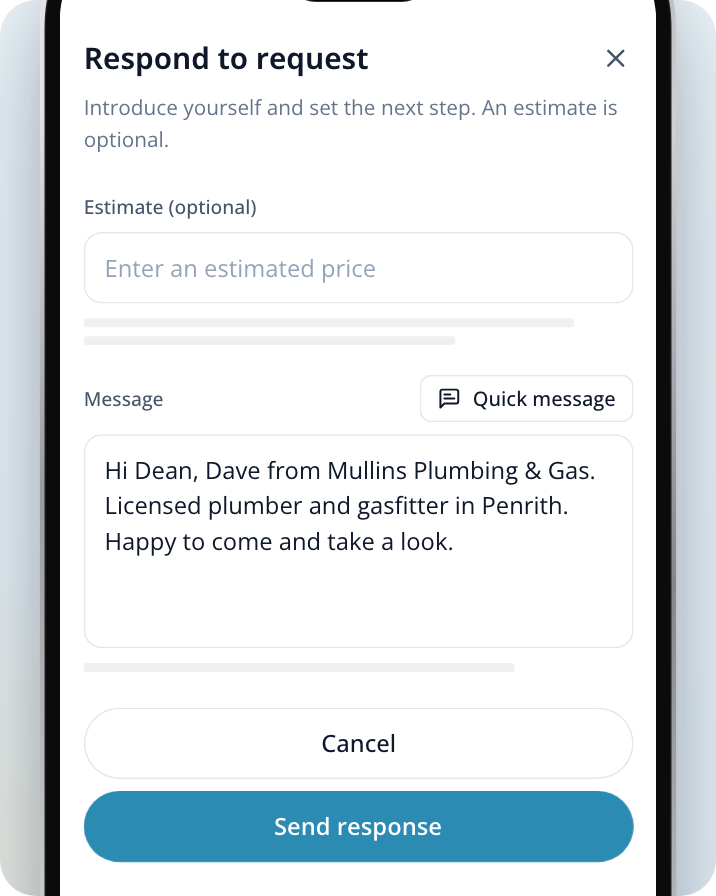
Send your response
Select Send response. You'll see Response sent, and the lead moves to Jobs. Select View job to open it.
What to include in your response
A good response makes it easy for the homeowner to trust you and take the next step.
- Introduce yourself and your business clearly.
- Mention the job details so the homeowner knows you have read the lead.
- Explain your experience if it's relevant to the work.
- Offer the next step, such as a call, a site visit or a quote.
- Keep your message short and easy to read.
A phone call is often the fastest way to build trust. A clear, timely message also works well, especially when the homeowner hasn't answered your call.
4. Set Up an Intro Message and Quick Messages
Typing the same introduction every time slows you down. Save it once and personalise it for each job.
- Your Intro Message fills in the Message box automatically each time you select Respond now. Add personalisation, such as the homeowner's first name, and it fills in from the job.
- Your Quick Messages are reusable messages you can pick from while you respond.
Open your Inbox settings
Go to your Inbox, open the ••• menu at the top of the list and select Inbox settings.
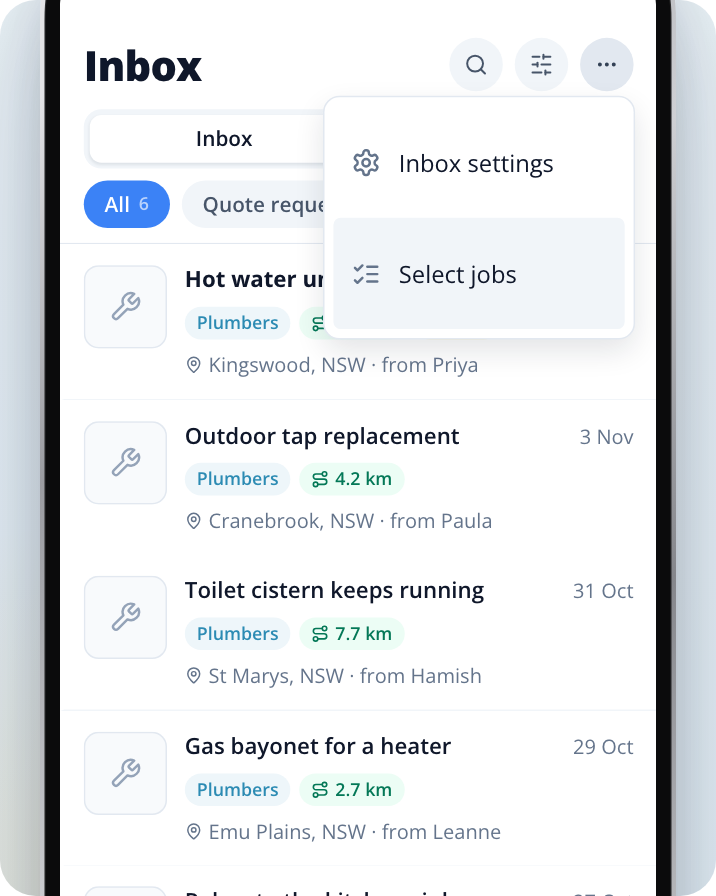
Write your intro message
Select Intro Message, write your introduction and select Save.
Add quick messages
Select Quick Messages, then select Add (or Create Quick Message if you don't have any yet).
Personalise each message
Select Insert Personalisation to add details that fill in from the job, such as the homeowner's first name.
Use these as a starting point, then tailor each response to the job. A message that clearly speaks to the homeowner's job beats a generic one every time.
5. Follow Up With Structure
Once you've responded, the lead lives in Jobs, with your conversation with the homeowner. If you don't hear back straight away, open the job from Jobs and send a polite follow-up message.
- Check your Jobs regularly so no conversation goes quiet.
- Keep track of who you've followed up with and when.
- Offer a clear next step each time, such as a time to call or visit.
Why People Buy Into People
Homeowners often choose the business that feels the most trustworthy, not just the one with the lowest price. A friendly tone, clear communication and genuine interest in the job can make a big difference.
When you respond, focus on being helpful and professional. Show the homeowner that you understand what they need and that you're ready to help.
Tips for New Businesses
If you're new to Service.com.au, you can still win work by building good habits early.
- Respond quickly to every suitable lead.
- Stay consistent with your follow-ups.
- Personalise your messages instead of relying only on generic replies.
- Be confident in your communication, even if your business is still growing.
- Treat every lead seriously, because smaller jobs can lead to larger opportunities.
Build a Simple Lead Process
A repeatable routine helps you convert more leads over time.
- Check your Inbox often so you can reply quickly.
- Use your Intro Message and Quick Messages as a starting point, then tailor them to the job.
- Call when it suits the job, to make a stronger first impression.
- Follow up from Jobs so you know who you've contacted.
- Look back at which leads you won and improve your approach over time.
Need Assistance?
If you have questions, contact us at support@service.com.au or call 1300 523 787. Our team is here to help!