Once a job is complete, the homeowner can leave a review about their experience with your business. Reviews appear on your profile and can help build trust with future homeowners.
Request a Review
Ask the Homeowner to Close the Job
After you finish the work, ask the homeowner to close their posted Job. When they do, they will be prompted to leave a rating and review for your business.
Open Your Dashboard
Log in to your account dashboard.
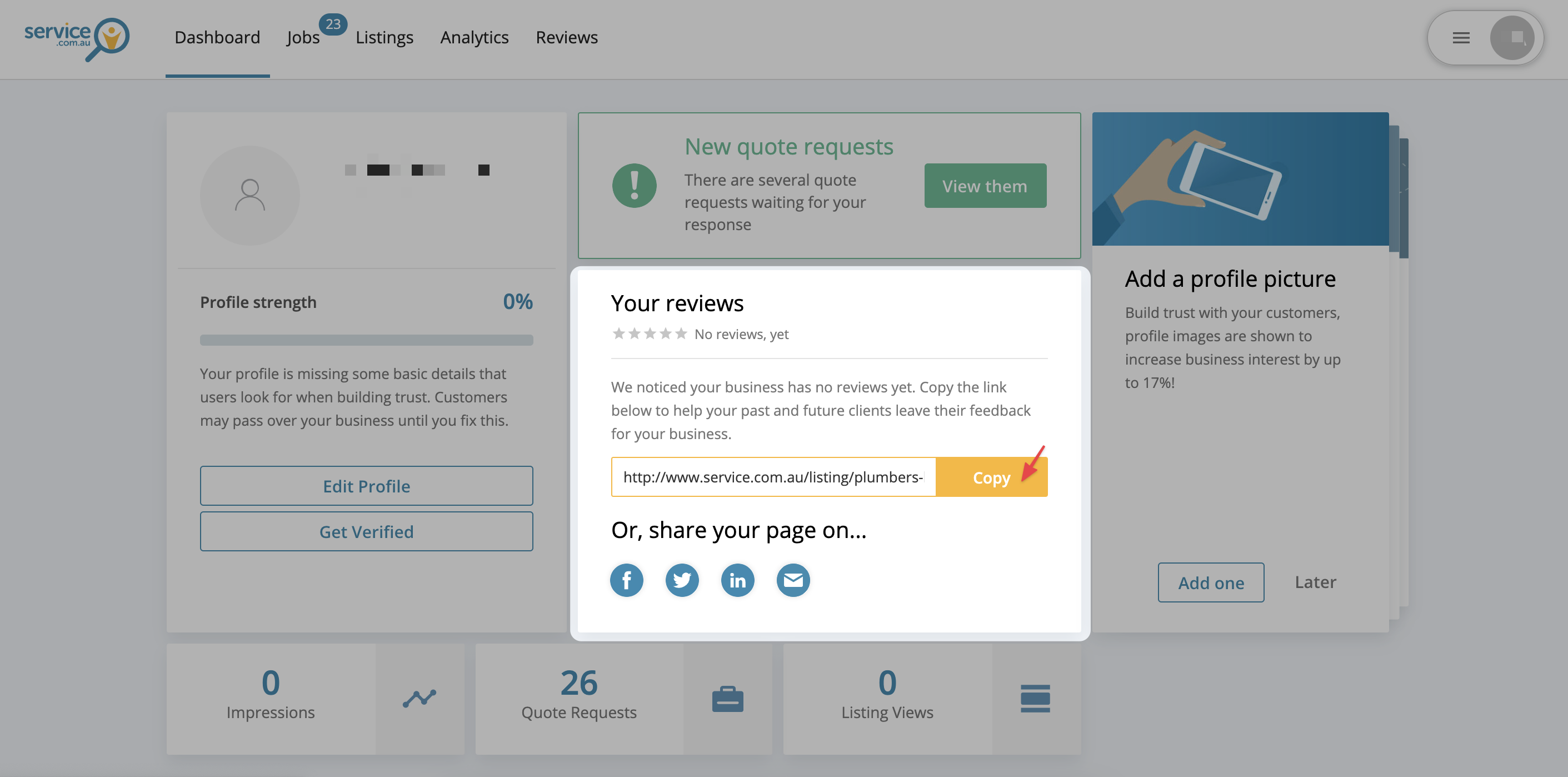
Copy Your Business Listing Link
Under Your reviews, copy the link to your Listing.
Send the Link to the Homeowner
Send your business listing link to the homeowner and ask them to leave a review.
View Your Reviews
You'll receive an email when a homeowner leaves a rating or comment.
Log In to Your Account
Log in to your account dashboard.
Open Reviews
In the menu bar, select Reviews to view your latest feedback.

Tips for Asking for Reviews
- Ask promptly after the job is complete while the experience is still fresh.
- Keep it simple by sending your listing link directly to the homeowner.
- Be polite and grateful when asking for feedback.
- Follow up with a friendly reminder if the homeowner has not left a review after a few days.
Need Assistance?
If you have questions, contact us at support@service.com.au or call 1300 523 787. Our team is here to help!